

This week we are extending our CP Connect plugin to allow pulling events from Planning Center Online using Registrations instead of the Calendar (how it works now). In doing so, we discovered that the Registrations API is technically not publicly available, much less documented. For that matter, none of the Planning Center Online API modules are documented very well. So I wanted to share a few tricks that we’ve discovered to help identify the various options that are not documented.
We are going to head over to the Church Center page for the needed information. I went to the Registrations page and opened up the developer tools to see what requests were being made. That’s where I found this:
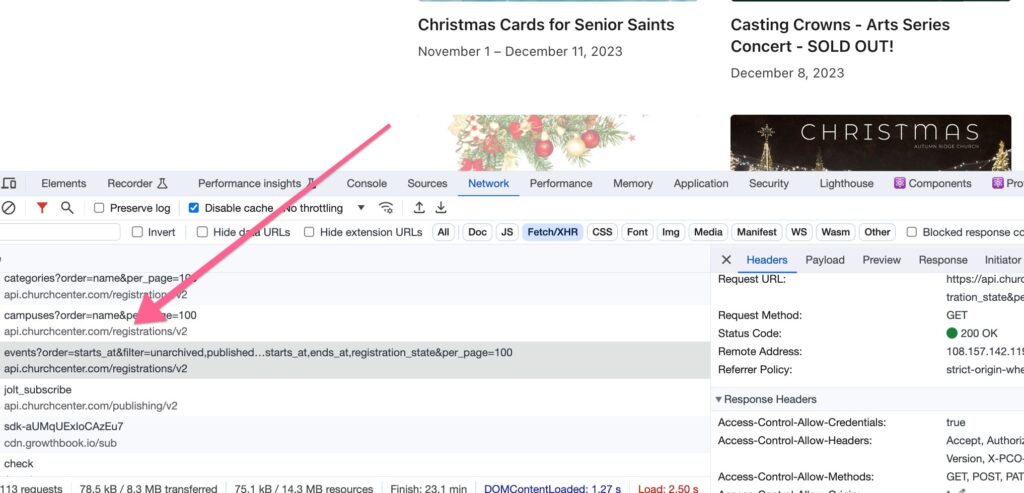
Fortunately for us, Church Center uses the API for practically all of the information it displays. I pulled up the Request URL and found the following: https://api.planningcenteronline.com/registrations/v2/events?order=starts_at&filter=unarchived,published&fields[Event]=name,featured,logo_url,event_time,starts_at,ends_at,registration_state&per_page=100
Bingo! This tells me that the MODULE name is “registrations” and the TABLE name is “events”. I also see a number of other parameters that I can use to filter the results. Church Center by default only shows Registrations that should be currently visible. To do this, it adds the “filter” parameter set to “unarchived,published”. It also limits the returned fields to name, featured, logo_url, etc.
We can also use this information to find out what other resources are available for Registrations using https://api.planningcenteronline.com/registrations/v2. This will give us a list of the tables that we can reach at the Registrations endpoint. (Thanks to Andrew for pointing this out to me!)
In CP Connect, we are using a helpful API wrapper from Scott Madeira called planning-center-api. To make this request in our plugin we’ll use the following code:
$raw = $this->api()
		            ->module( 'registrations' )
		            ->table( 'events' )
		            ->order( 'starts_at' )
		            ->filter( 'unarchived,published' )
		            ->parameterArray( [
			            'fields[Event]' => 'name,featured,logo_url,event_time,starts_at,ends_at,registration_state'
		            ] )
		            ->get();
With this API wrapper, we specify the module, table, order, filter, and additional parameters. Since the fields[Event] is not a built in parameter, we use the parameterArray function.
We have found that the PCO API often leaves us with more questions than answers. Using the above strategy has helped us to track down the available options when they do not exist in the documentation.
A final word of caution. While the above can help identify the existing API configuration, using undocumented APIs can be dangerous since the API is likely to change without any warning. So keep an eye on any integrations that you build using the above methods.
If you need help creating your own integration or would like more information about CP Connect, please reach out! We would love to help get your church connected to Planning Center Online.


Thank you!!