
 CP Sync
Connect your church management software to your website and sync events and groups automatically.

How CP Sync works
Keep your website up to date with what's already in your church management system (ChMS)
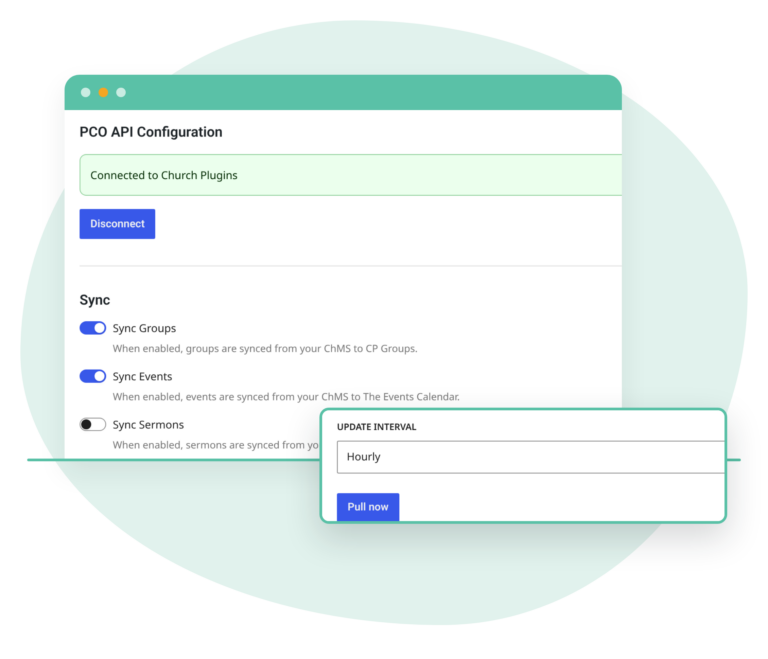
Connect
Connect and schedule
- Planning Center Planning Center connects by signing in, with no API keys.
- Church Community Builder Sync groups and events from CCB.
- Scheduled syncs Hourly, daily or weekly, or Pull now.
- No duplicates Re-syncs update existing items instead of duplicating them.
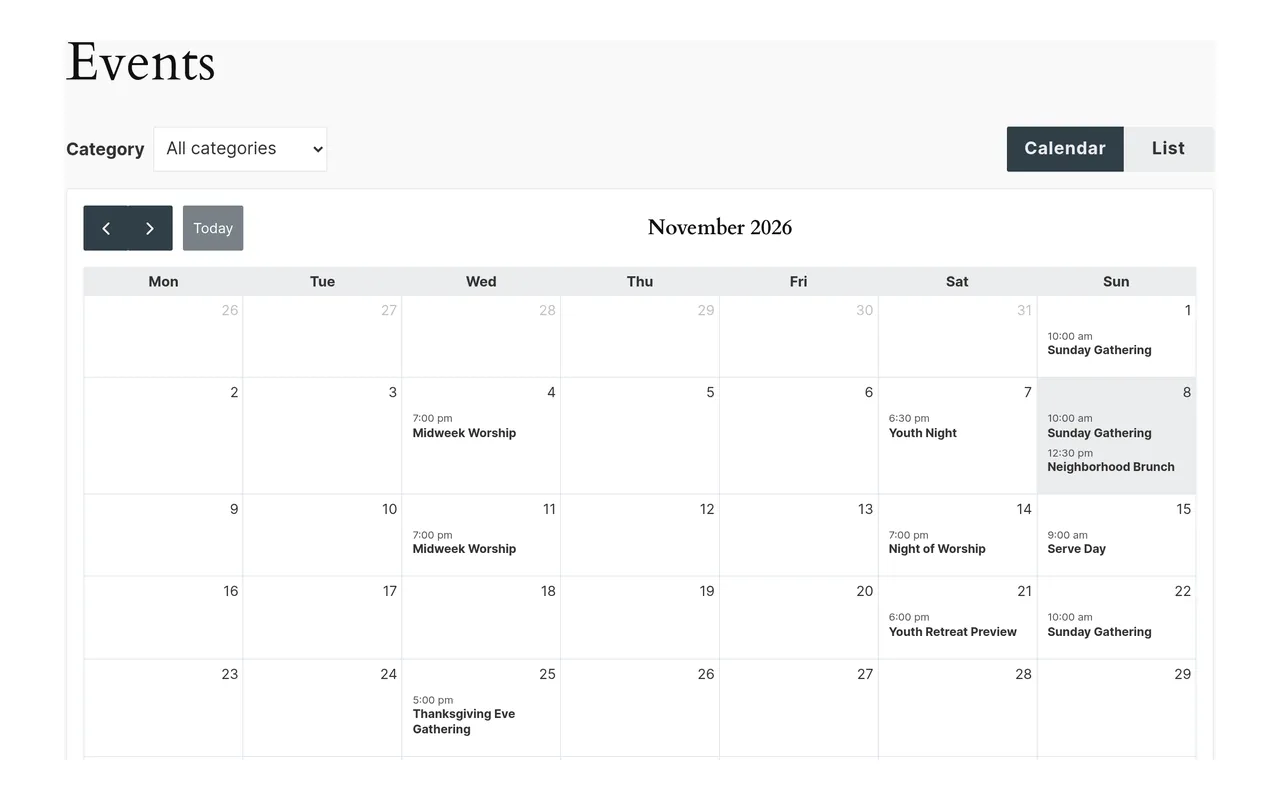
Events and sermons
Events on your site, or in The Events Calendar
- Events page Opens on a month calendar, with a switch to a list, and a Category filter when events have categories.
- Event pages Each date gets a page with one Add to calendar button, and a series gets a series page.
- The Events Calendar (free) Already use it? CP Sync keeps sending your events there.
- Sermons from Publishing Episodes become CP Sermons 1.7.0+ sermons.
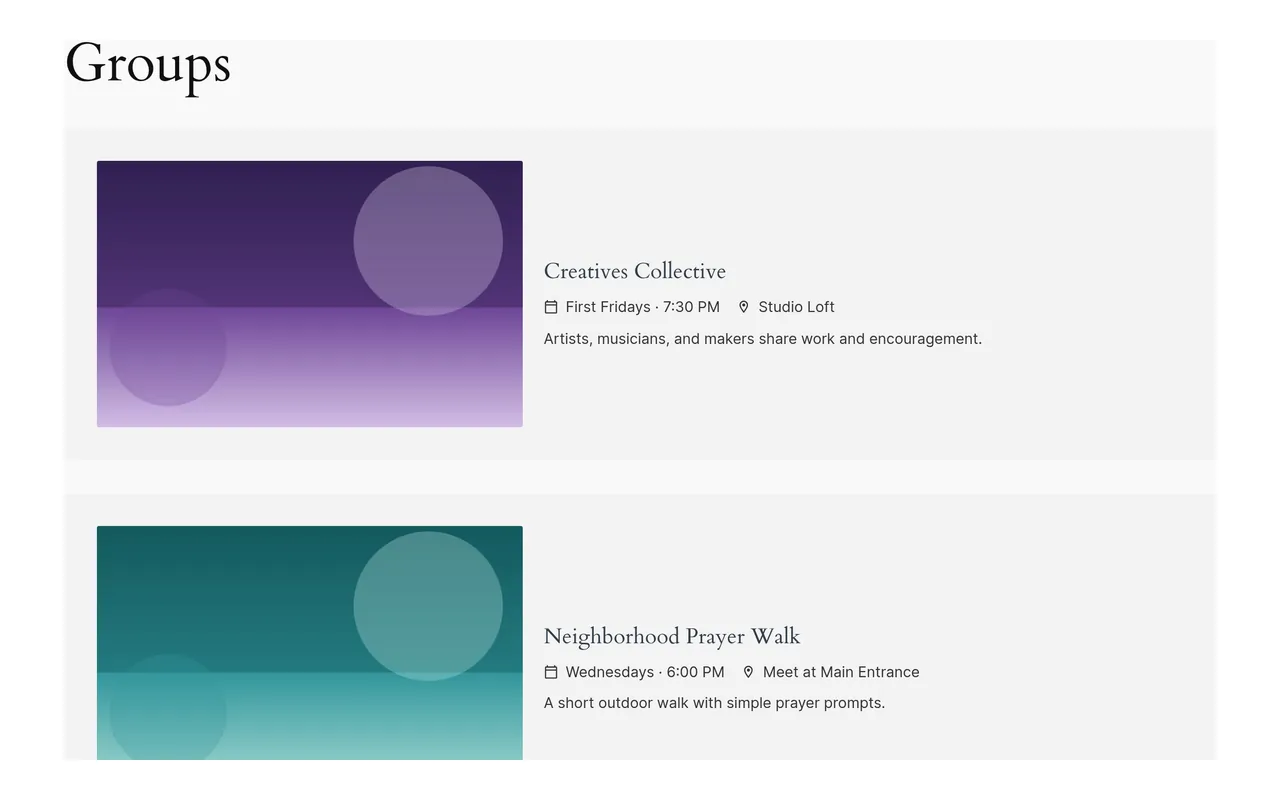
Groups
Show your groups on your site
- Groups page and group pages A /groups/ page of full-width rows, and a page for each group, with photo, meeting details and leaders.
- Choose what imports Include or exclude groups by tag, group type and more.
- CP Groups (optional) Adds filters and a contact form, using the same groups.
- CP Locations A CCB group's campus becomes its location when CP Locations is active.
Works with
Check these before you buy. If something you use isn't listed, ask us a question before you buy. Every plan has a 30-day full refund.
Requirements
- WordPress 6.0 or later
- PHP 7.4 or later
- Tested up to WordPress 7.1
- Current version 1.2.0 · Changelog
Works with
Church management software
- Planning Center: Groups, Calendar, Registrations and Publishing
- Church Community Builder (CCB): groups and events
Show your data with
- CP Sync on its own (events and groups pages)
- The Events Calendar, free, optional (if you already use it)
- CP Groups, optional (adds filters and a contact form)
- CP Sermons 1.7.0+ (Planning Center sermons)
- CP Locations (CCB group campus)
Choose your plan
30-day full refund on every plan.
-
Recommended
Yearly
Renews every year for updates and support.
-
Monthly
Renews every month for updates and support.
-
Lifetime
One payment. The license key never expires.
Prices are in USD. Monthly and yearly licenses renew automatically to keep updates and support active. Lifetime licenses don’t renew. Terms
All Access Pass
Need more than one plugin? Get all 6 plugins, plus every plugin we release in the future, under one license.
$249 / year ($183 less than buying all 6 yearly)
Questions about CP Sync
Do I need other plugins?
Not for events and groups. CP Sync can show your events and groups on your site by itself. If you already use The Events Calendar (free), CP Sync keeps sending events there. Add CP Groups if you want filters and a contact form for your groups; it uses the same groups. Sermons from Planning Center still need CP Sermons (version 1.7.0 or later), and they are off by default until you turn them on. CP Groups and CP Sermons are both included in the All Access Pass.
What can I sync, and from which ChMS?
Planning Center and Church Community Builder. From Planning Center: groups, events (Calendar and/or Registrations) and sermons (Publishing; off by default, needs CP Sermons 1.7.0+). From CCB: groups and events. On CP Sync's own event pages, a CCB event shows its location name. With The Events Calendar, a CCB event that has a numeric id can also get a venue with its address, and an image. See the full field list.
What do the event pages show?
/events/ opens on a month calendar, with a switch to a list of upcoming dates. When your events have categories, a Category filter shows one category at a time. For Church Community Builder, an event's type is used as its category when the listing includes one. Each date gets its own page with the date and time, location and description, and a Register button when your ChMS sends a link. A Planning Center registration that costs money shows its price next to Register, or a range when there are several options. The Add to calendar button downloads a calendar (.ics) file for that date. An event with more than one date also gets a series page that lists its upcoming dates. To show the next few dates on another page, add the [cp-sync-events] shortcode.
I already use The Events Calendar. Does anything change?
No. While The Events Calendar is active, CP Sync keeps sending events there and doesn't create its own event pages. For Planning Center registrations, the price also fills in the event's cost, unless you entered a cost yourself.
What do the group pages show?
A groups page at /groups/ lists your groups in full-width rows, each with its photo, meeting time, location and a short description. Each group's own page adds the full description, leader names, and buttons to view details or register when your ChMS sends those links. Leader email addresses are not shown. To show groups on another page, add the [cp-sync-groups] shortcode. Filters and a contact form come with CP Groups.
I have an embed code from my ChMS, why do I need CP Sync?
CP Sync allows you to import your ChMS data automatically into your website. This gives you full control over the display and functionality of your content. This also allows you to keep visitors on your website and eliminates confusing redirects to and from your ChMS.
How often does it sync?
Hourly by default, or daily or weekly. The first sync runs about an hour after setup, and Pull Now runs one right away. There's no time-of-day setting.
Will it change anything in Planning Center or CCB?
No. CP Sync only brings data into your website. It never writes back to your ChMS.
What if I edit a synced event or group on my site?
Make changes in your ChMS. When CP Sync shows your events and groups itself, they don't have screens in the WordPress admin, because the sync owns their content. With The Events Calendar or CP Groups, an edit on your site is replaced by the ChMS version on the next sync. To keep your changes there, check "Prevent sync from updating this post" on that post.
What do I need to set it up?
WordPress 6.0+, PHP 7.4+ and an Administrator login. Planning Center connects with a Connect button; CCB needs an API username and password. Then turn on Sync Events and/or Sync Groups on the Connect tab. If your site already has a page at /events/, leave Sync Events off until you're ready for CP Sync's event pages to use that address.
What's the difference between CP Sync and the All Access Pass?
CP Sync is the single plugin. The All Access Pass includes all current and future Church Plugins, including CP Groups and CP Sermons, under one license.
Can I choose which events or groups come over?
Yes. For Planning Center Registrations events, you can choose specific categories to bring over. For Planning Center groups, the tag groups you select become categories on your site. You can also use filters to choose which groups, events and sermons import.
What happens when my license expires?
The plugin keeps working on your site. Updates need an active license key, so your site won't get new versions while the license is expired. Monthly and yearly plans renew automatically to keep the license active. Lifetime licenses don't expire.
Where do I find my license key and how do I activate it?
Your license key is on the Licenses tab in My Account, and the plugin zip is on the Downloads tab. In WordPress, go to Church Plugins → CP Sync → License, paste the key and click Activate. The active key is what delivers plugin updates to your site. See activating your license.